The Varnish Virtual Registry (also know as Orca) controls, routes, accelerates, and secures the delivery of software packages like Docker images, NPM Packages, Helm Charts, Go Modules, Git repositories, and many more.
By positioning the Virtual Registry as a reverse caching proxy in front of the actual registries that deliver the artifacts, these artifacts can be cached. This speeds up CI/CD pipelines, reduces developer friction, and lowers operational costs.
This applies to public registries (like Docker Hub or npmjs.com), private registries (like JFrog Artifactory or Sonatype Nexus), and source code repositories.
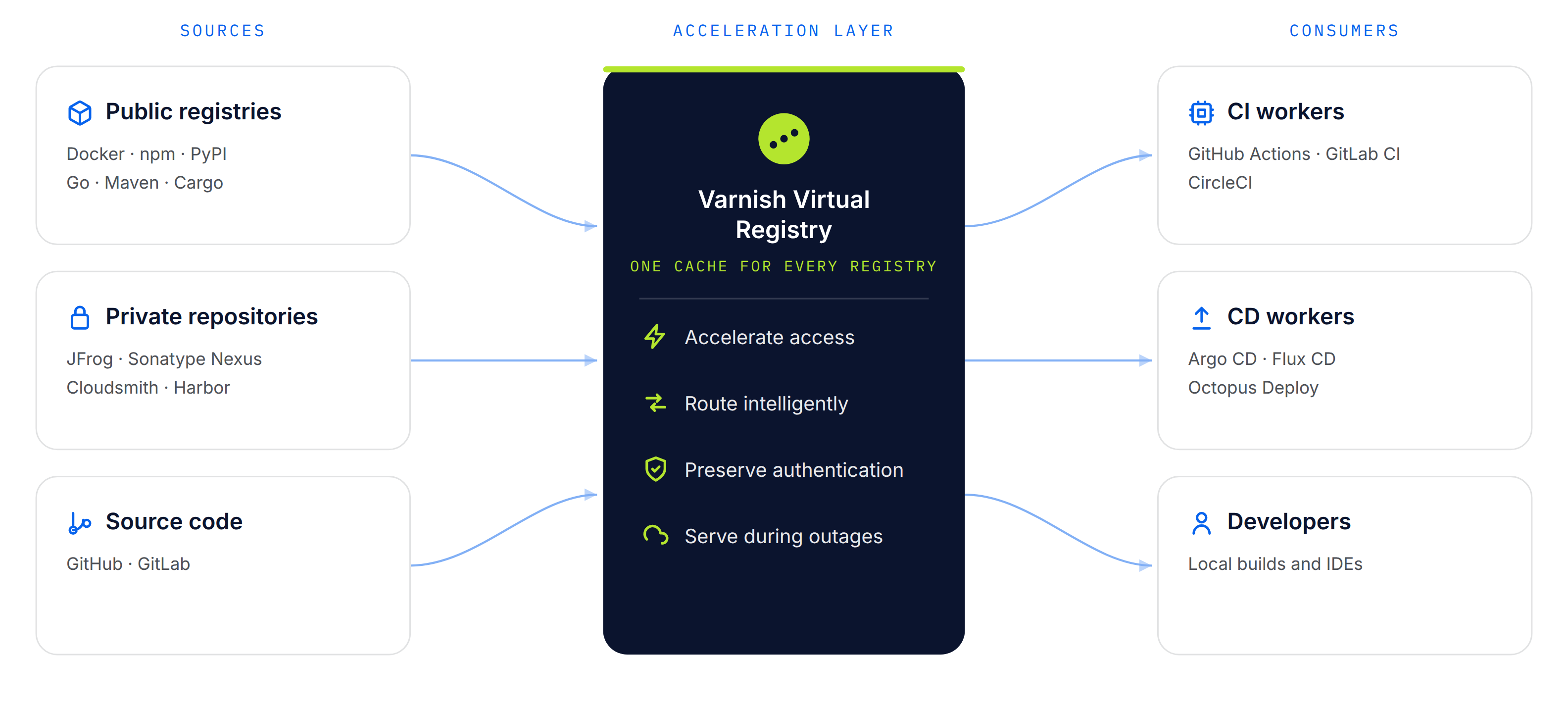
The Varnish Virtual Registry serves as the single point of entry for the delivery of all software packages, allowing dynamic routing to registries, which eliminates vendor lock-in. This single entrypoint also enables an observability layer that provides meaningful insights on artifact use across registries.
It’s a vendor-neutral way to reduce build delays, infrastructure costs, egress, and dependency on overloaded and expensive repository platforms.
Besides acceleration, control, observability and routing, the Varnish Virtual Registry can also enforce package-specific security rules, through the Varnish Artifact Firewall.
The Varnish Virtual Registry is distributed as part of project Orca. This project packages both the Virtual Registry and the Artifact Firewall.
The Orca distribution offers a Docker image, a Helm chart, DEB packages and RPM packages.
See the installation page for more details.
To deploy the Varnish Virtual Registry through the official Docker image, simply run the following command:
docker run -p 80:80 varnish/orca
This exposes the Virtual Registry locally on the standard HTTP port with the default configuration.
See the Docker installation page for more details.
The Virtual Registry container can also be deployed on a Kubernetes cluster using our official Helm chart.
Run the following helm install command to deploy the Varnish Virtual Registry on your Kubernetes cluster:
helm install -f values.yaml varnish-orca oci://docker.io/varnish/orca-chart
Customize the behavior through the values.yaml file and see the Helm installation page for more details.
To install the Varnish Virtual Registry on a Debian or Ubuntu Linux system, run the following commands:
curl -s https://packagecloud.io/install/repositories/varnishplus/60-enterprise/script.deb.sh | sudo bash
sudo apt -y install varnish-supervisor
For more information, please see the Debian/Ubuntu installation page.
To install the Varnish Virtual Registry on a Red Hat Enterprise Linux-based Linux system, run the following commands:
curl -s https://packagecloud.io/install/repositories/varnishplus/60-enterprise/script.rpm.sh | sudo bash
sudo yum -y install varnish-supervisor
For more information, please see the RHEL/CentOS installation page.
The Varnish Virtual Registry can be configured through a YAML config file. This is the default YAML config that is shipped with the standard setup:
varnish:
  http:
  - port: 80
virtual_registry:
  registries:
  - name: dockerhub
    default: true
    remotes:
    - url: https://docker.io
    - url: https://mirror.gcr.io
  - name: quay
    remotes:
    - url: https://quay.io
  - name: ghcr
    remotes:
    - url: https://ghcr.io
  - name: k8s
    remotes:
    - url: https://registry.k8s.io
  - name: npmjs
    remotes:
    - url: https://registry.npmjs.org
  - name: go
    remotes:
    - url: https://proxy.golang.org
  - name: github
    remotes:
    - url: https://github.com
  - name: gitlab
    remotes:
    - url: https://gitlab.com
This configuration file sets the standard port that Varnish listens on, and configures a list of registies that the Varnish Virtual Registry will route package requests to.
Each registry entry has a name and a list of remotes that is associated with that registry. Registry entries can be addressed by putting the registry name in the subdomain that used to connect with the Virtual Registry.
For example: routing NPM package requests to npmjs.localhost on your local machine, would trigger the npmjs registry entry, and would proxy those package requests to https://registry.npmjs.org.
See the configuration page to learn more about the various configuration settings.
Once you have installed and configured the Varnish Virtual Registry, you can use the Virtual Registry as the endpoint to fetch dependencies for the different packages types you configured.
Here are a couple examples for different types of dependencies. More examples and tutorials can be found in the tutorials section.
The following example command will install the ubuntu Docker image through the Virtual Registry using the docker.example.com endpoint:
docker pull docker.example.com/library/ubuntu
This example assumes docker.example.com resolves to the IP address of the Virtual Registry setup. It also assumes a registry entry called docker is configured that has https://docker.io as its remote.
Take a look at the Docker client configuration tutorial to learn more about how to connect your docker client to the Varnish Virtual Registry to fetch Docker images.
The following example command will install the express NPM package through the Virtual Registry using the npmjs.example.com endpoint:
npm install express --registry=https://npmjs.example.com
This example assumes npmjs.example.com resolves to the IP address of the Virtual Registry setup. It also assumes a registry entry called npmjs is configured that has https://registry.npmjs.org as its remote.
Take a look at the NPM client configuration tutorial to learn more about how to connect npm to the Varnish Virtual Registry.
The following example command will install your Go program’s dependencies through the Virtual Registry using the go.example.com endpoint:
GOPROXY=http://go.example.com go mod tidy
This example assumes go.example.com resolves to the IP address of the Virtual Registry setup. It also assumes a registry entry called go is configured that has https://proxy.golang.org as its remote.
Take a look at the Go client configuration tutorial to learn more about how to fetch Go modules through the Varnish Virtual Registry.
The following example command will install the boto3 Python package through the Virtual Registry using the pip.example.com endpoint:
pip install --index-url https://pip.example.com/simple/ boto3
This example assumes python.example.com resolves to the IP address of the Virtual Registry setup. It also assumes a registry entry called pip is configured that has https://pypi.org as its remote.
Take a look at the Pip client configuration tutorial to learn more about how to connect pip to the Varnish Virtual Registry.
The following example command will download the bitnamicharts/postgresql Helm chart through the Virtual Registry using the docker.example.com endpoint:
helm pull oci://docker.example.com/bitnamicharts/postgresql
This example assumes docker.example.com resolves to the IP address of the Virtual Registry setup. It also assumes a registry entry called docker is configured that has https://docker.io as its remote.
Check out the changelog to get an overview of Varnish Virtual Registry releases, describing feature additions, changes, fixes and removals per version.
