JFrog Artifactory is a Universal Repository Manager that stores and delivers artifacts as part of the software supply chain. Artifactory provides private registries with centralized management and access controls for a large variety of artifact types.
Although Artifactory provides significant value to organizations, it also comes with distinct performance and scalability challenges. This tutorial explains how Varnish Orca tackles these issues, and offers improved performance at massive scale.
As you can see in the image below, you can create different registries that match the artifact types you want to host on Artifactory:
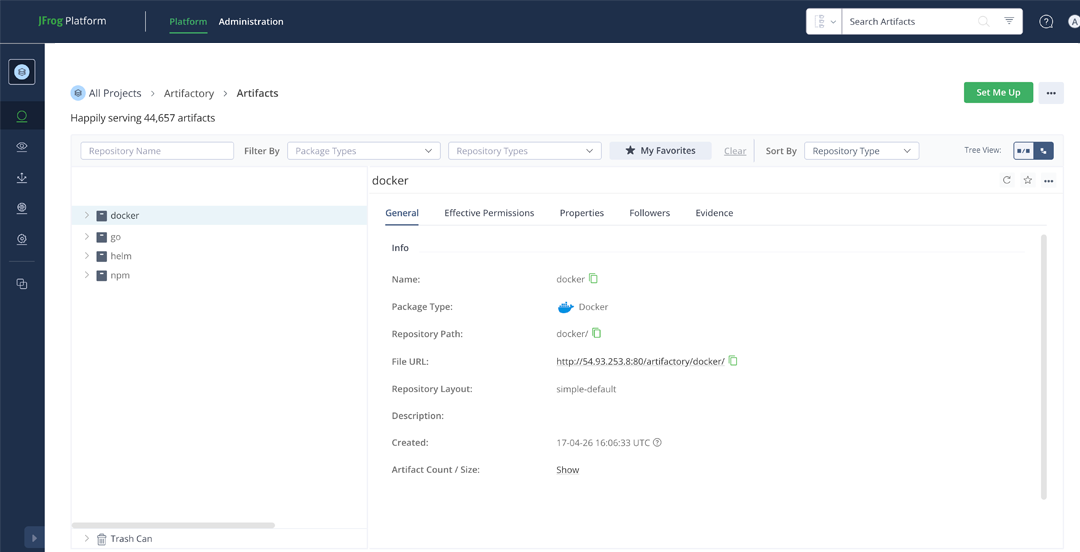
The artifacts that are hosted on Artifactory can be fetched using the native client of that artifact.
This could be a docker pull, an npm install, a helm install, a go get.
Here’s an example of how JFrog Artifactory documents client configuration for the NPM registry:
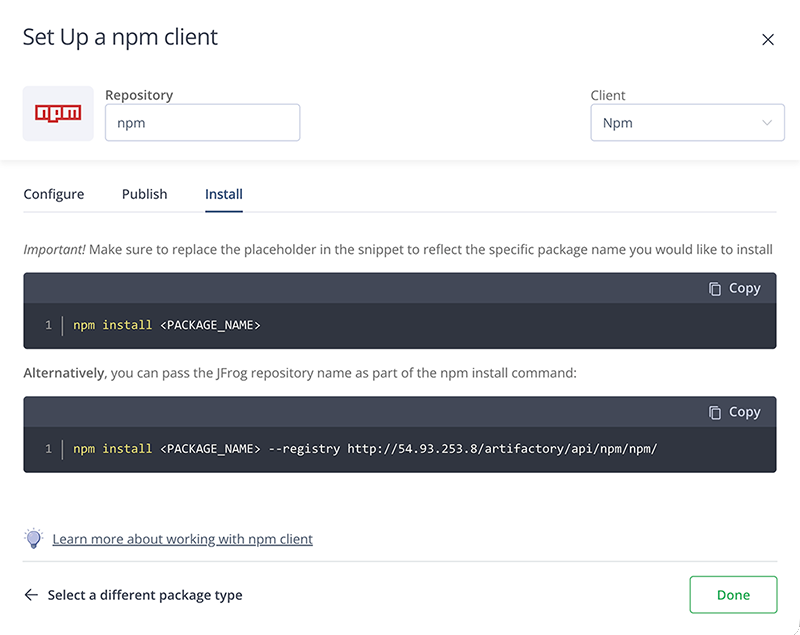
The versatility of the supported artifact types in JFrog Artifactory ensures that it can be used by many parts of the software supply chain:
These use cases put a lot of pressure on your Artifactory setup, and with the right traffic patterns on a large set of artifacts, performance degradation will take place.
While network pressure is a factor, the primary challenge with JFrog Artifactory is that it is database-bound. High concurrent request loads on a large variety of artifacts can overwhelm the database layer, causing performance degradation across your entire artifact delivery pipeline.
Rather than vertically scaling the underlying hardware, or adding Artifactory nodes to scale horizontally, you can offload that pressure by using a virtual registry.
As the diagram below illustrates: Varnish Virtual Registry (Orca) can be added in front of JFrog Artifactory as a highly specialized reverse caching proxy.
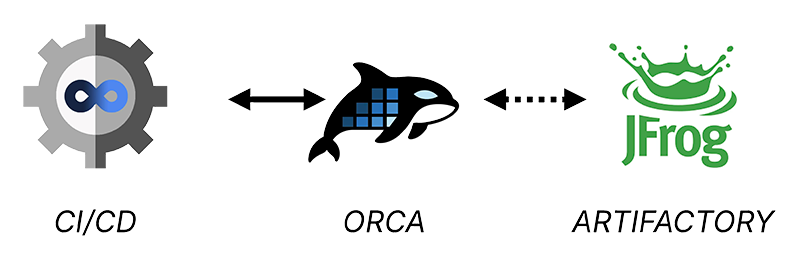
Clients that fetch artifacts will fetch them directly from Orca instead of Artifactory. If an artifact is found in the cache, Orca will deliver it immediately, if not Orca fetches the requested artifact from Artifactory.
The Varnish Virtual Registry (Orca) is built on top of Varnish Enterprise and is optimized to handle artifacts in a protocol-native way:
Varnish Orca is easy to install and deploy:
Have a look at our install guide for more information.
A typical deployment pattern would be to install Orca close to your JFrog Artifactory setup, whether you are on a self-hosted Artifactory setup, or a SaaS deployment in the Cloud.
Besides offloading pressure from your Artifactory server, you can also offload the network, and reduce network latency by positioning Orca instances exactly where you need them.
The diagram below shows a multi-site deployment where Orca instances are strategically positioned:
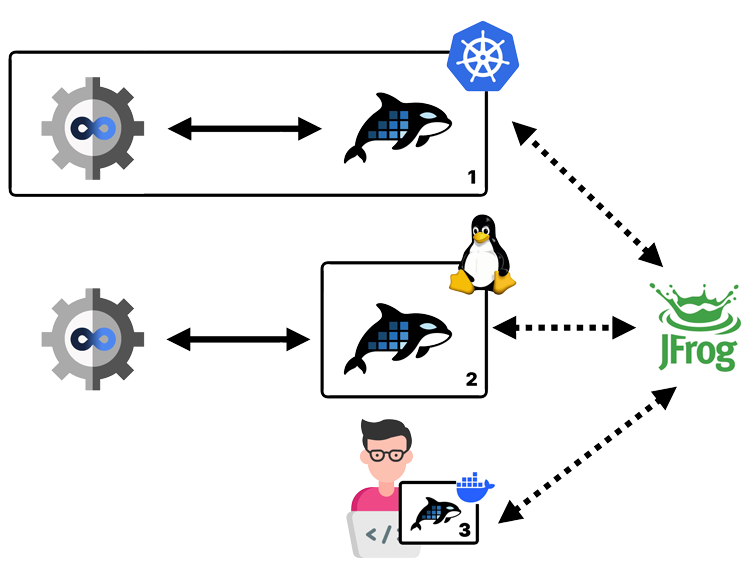
The Orca deployments connect to the same Artifactory setup and offer the following benefits:
Configuring Orca is straightforward and only requires a single config.yaml file.
The Orca configuration documentation is the reference for this config file. The install guide explains how to deploy that configuration file.
Here’s an example of an Orca config file that offers support for JFrog Artifactory:
varnish:
  https:
  - port: 443
acme:
  email: user@domain.com
  domains:
    - artifactory.orca.example.com
  ca_server: production
license:
  file: /app/license.lic
virtual_registry:
  registries:
  - name: artifactory
    default: true
    remotes:
    - url: https://artifactory.example.com
This hypothetical config file is available on port 443 for HTTPS traffic. The TLS certificate for artifactory.orca.example.com is requested via LetsEncrypt.
Have a look at the TLS configuration tutorial for more information.
Some of the premium features in Varnish Orca require a commercial license. The example config fetches that license from /app/license.lic on the disk.
Have a look at the custom license registration tutorial for more information.
Want to give the premium features a try? Request a free premium trial license.
Request a free premium trial license →The example configuration only has a single virtual registry entry, which points to https://artifactory.example.com, which is the hypothetical hostname of your JFrog Artifactory service.
The default: true setting ensures that any request on the Orca server will end up reaching Artifactory, even if the hostname does not contain artifactory.*.
Have a look at the virtual registry configuration section of the documentation for more information.
Now that Varnish Orca is deployed and configured, you can fetch artifacts from it.
If you change the DNS record of your Artifactory endpoint to the IP address of your Orca setup, the process will be transparent. If that’s not the case, you need to reconfigure your artifact clients.
We have a list of client configuration tutorials that explains how to configure your client to fetch artifacts from Orca.
But here are a couple of common examples.
To fetch NPM packages from Orca, simply add a --registry option that points to Orca:
npm install --registry=https://artifactory.example.com
Have a look at our NPM client configuration tutorial for more information.
Similarly, for Go you can set the GOPROXY environment variable to the endpoint of Orca:
GOPROXY=https://artifactory.example.com go mod tidy
Have a look at our Go client configuration tutorial for more information.
And for Docker images, you could re-tag and push your images:
docker tag artifactory.example.com/docker/todo artifactory.orca.example.com/docker/todo

docker push artifactory.orca.example.com/docker/todo
This assumes you have an Artifactory registry for Docker named docker that is hosted on artifactory.example.com. The todo image is re-tagged to artifactory.orca.example.com/docker/todo and pushed to Artifactory via Orca on https://artifactory.orca.example.com.
You can then pull the image as follows:
docker pull artifactory.orca.example.com/docker/todo
You can also configure your Docker daemon to use Orca as a registry mirror, instead of re-tagging your images. We have a Kubernetes tutorial that explains how to re-configure containerd and use the Orca endpoint as a registry mirror.
