This page describes how the Artifact Firewall works inside: the path a request takes, how a decision is reached, where the rules come from and how they change, what state the process keeps, the resources it uses, and how it behaves when a dependency fails. It describes the standalone deployment as of Artifact Firewall 0.10.0. Where an earlier version behaves differently, the version is named.
The Artifact Firewall is a single Go process that sits in the request path between package managers and a package registry. It decides, for each package version, whether it is served, hidden from listings or refused. It is a proxy and a policy engine, not a repository manager: it stores no packages, and every allowed download is fetched from the registry behind it and streamed to the client.
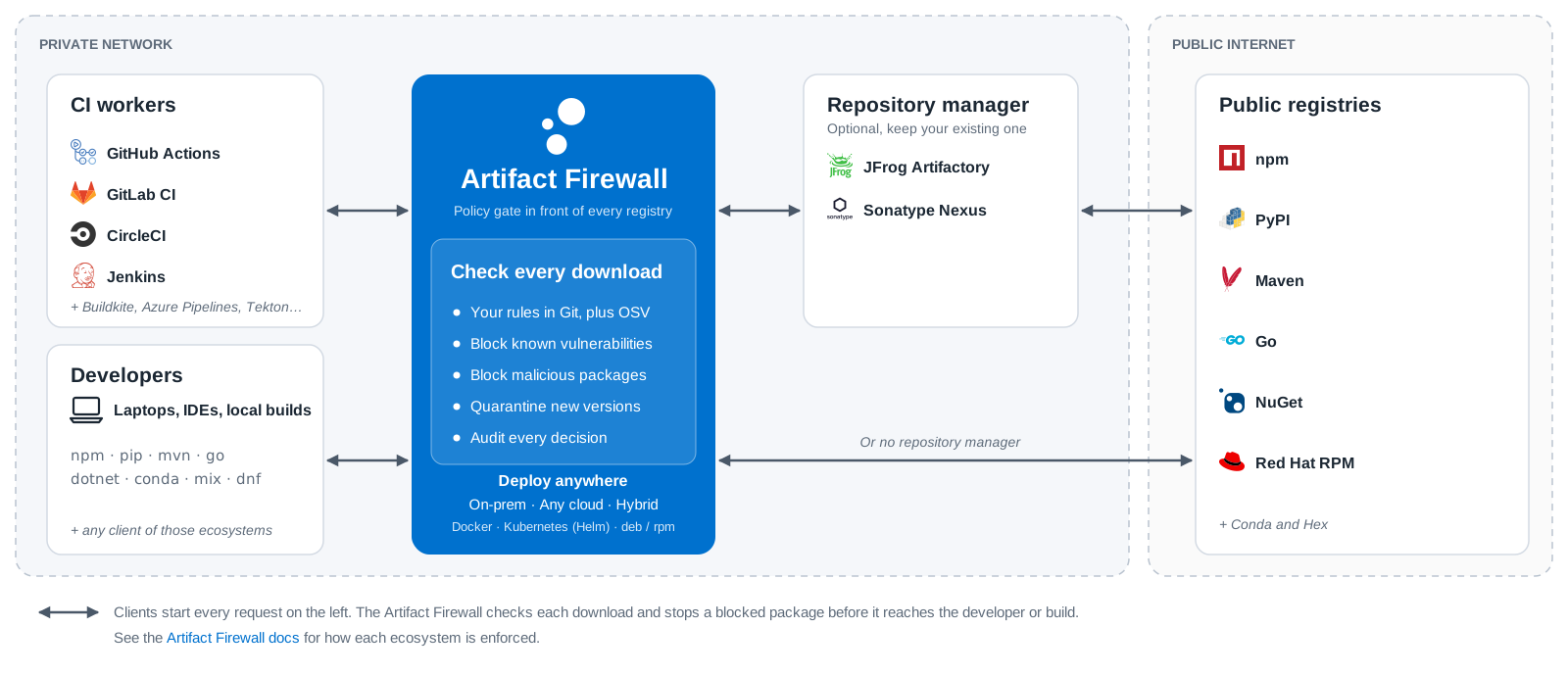
The registry behind it can be a public registry such as registry.npmjs.org, a repository manager such as JFrog Artifactory or Sonatype Nexus, or a cache. Nothing changes in that registry. Clients are pointed at the firewall instead of at the registry, and the firewall forwards to it.
The firewall runs in one of two deployment modes:
standalone: clients send their requests to the firewall, which routes each one to a configured registry. This is the mode this page describes.integrated: the Varnish Virtual Registry receives the requests, caches what it serves, fetches manifests through the firewall and asks the firewall about each artifact before serving it, from its cache or not. Deployment describes both.The process opens two listeners:
6089 by default. Package managers are pointed here. It serves plain HTTP; HTTPS towards clients is terminated by a load balancer or reverse proxy in front of the firewall.127.0.0.1:6090 by default. It reloads rulesets, evaluates a single package, changes the mode and turns single rules on or off. It has no authentication, which is why it listens on the loopback interface unless api_address says otherwise.Both listeners serve /healthz and /readyz.
Each request goes through the same steps.
routes of every configured registry. A route matching the Host header wins first; otherwise the longest matching path prefix wins. A request that matches no route is answered 404.Accept header, the User-Agent and the shape of the URL. A route can set force_ecosystem to skip detection, which is how a client the firewall does not recognise, such as a repository manager fetching through it, is still checked.maven-metadata.xml), or for a package body (a tarball, wheel, .nupkg or .jar).remote_url with the client’s path, over HTTPS when remote_url says so.A manifest is fetched, buffered, filtered and then sent to the client. Denied and hidden versions are removed or marked, depending on the ecosystem, latest is moved to the highest allowed version, and download links are rewritten to point at the firewall, so that the download comes back through it. A package body is evaluated before the request is forwarded. A denied version is answered 403, naming the rule, and the request never reaches the registry; an allowed one is fetched and streamed through unchanged, so checksums and signatures still verify.
The diagram follows both kinds of request for one npm package, is-number, through a firewall in front of JFrog Artifactory, with a rule that holds version 7.0.0. Block a Package Version in Artifactory with a Standalone Artifact Firewall sets up the same case.
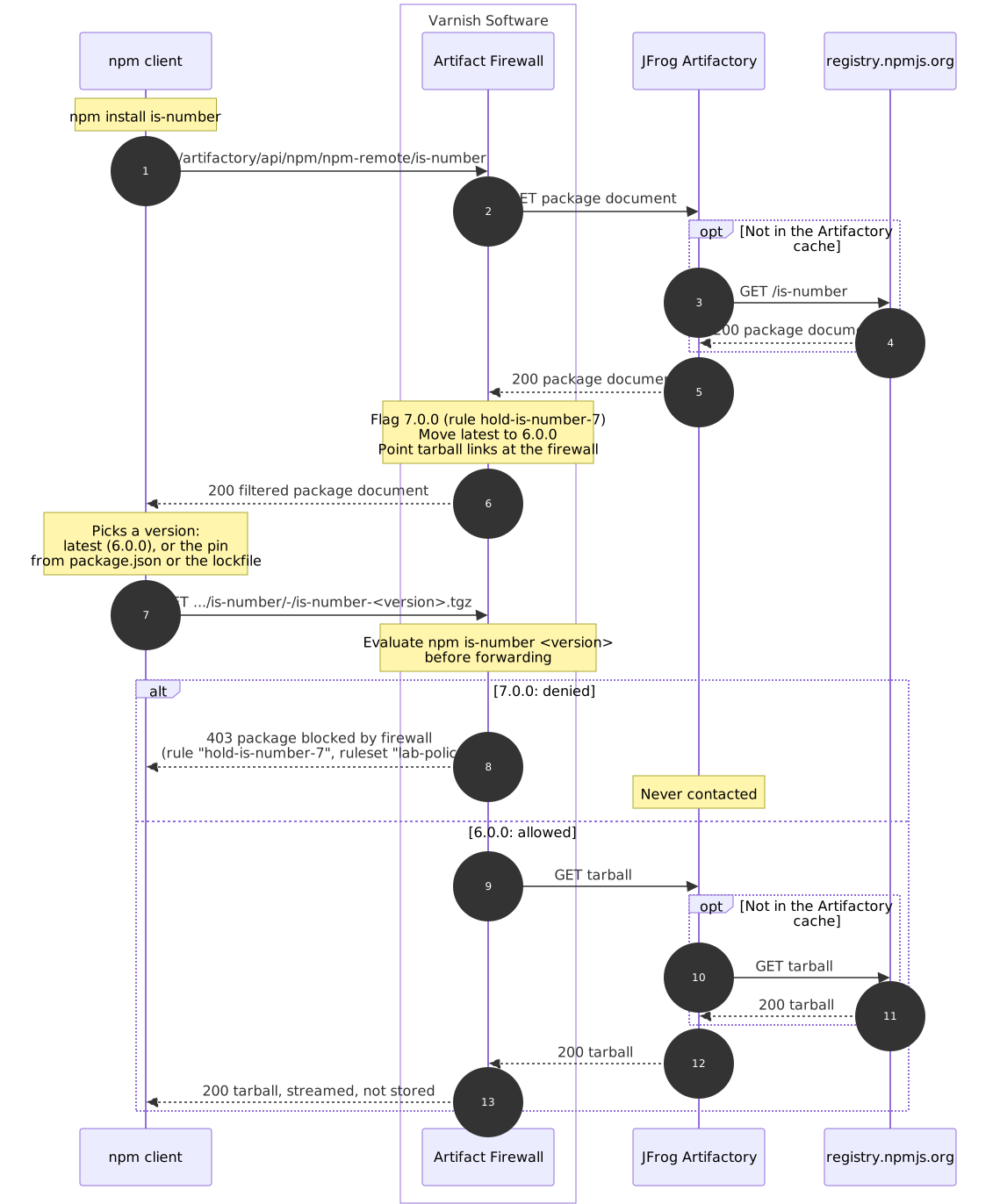
Because a download is evaluated before it reaches the registry, it does not matter whether the registry already holds a copy of a denied version. Enforcement by package type describes what a decision does in each ecosystem.
A request whose package type cannot be detected, and whose route sets no force_ecosystem, is passed through without evaluation. Routes in front of a repository manager, whose own requests the firewall may not recognise, set force_ecosystem for that reason.
A ruleset is a list of rules. Each rule selects packages by Package URL and version range, and resolves to one of three actions:
allow: the version is served.hide: the version is kept away from a client resolving latest or a range, but a request that names it outright still gets it.deny: the version is kept away from a client resolving latest or a range, and a request that names it is refused with a 403.A rule states its action, or carries a severity score from 0 to 10 and lets the firewall derive the action from two thresholds. With the defaults, a score of 9 or above resolves to deny, 4 or below to allow, and anything in between to hide. The thresholds are severity_deny_threshold and severity_allow_threshold.
Rules are evaluated in priority order, highest first, and the highest priority that has a matching rule decides. When several rules match at that priority, the strictest action wins: deny over hide over allow. An allow rule at a higher priority than the OSV rules therefore lets a version through that an OSV rule would deny. A version that no rule matches gets the default_action, allow unless configured otherwise.
Two settings apply on top of the rules:
default_quarantine_days keeps a version out of latest until it has been published for that many days, as a guard against malicious releases that have not been reported yet. It is off by default.mode decides whether decisions are enforced. In normal they are. In hide a deny is downgraded to a hide. In report nothing is enforced, and every decision is still evaluated, written to the audit log and counted, so the effect of a ruleset can be measured before it is turned on.Every decision is written to the audit log with the package, the rule and ruleset that decided it, the action the rule asked for and the action that was enforced.
The firewall reads rulesets from three kinds of source:
path: a file or directory on local disk.git: a file or directory in a Git repository, fetched on an interval. Access to a private repository uses a token or a GitHub App.http: a zip or tar archive fetched on an interval over HTTP or HTTPS, from an S3 or GCS bucket, a web server or an Artifactory generic repository. Each poll is a conditional request, so an unchanged archive costs a 304.Varnish publishes rulesets generated every hour from the OSV vulnerability database in varnish/osv-rules, one per ecosystem. Each rule carries the advisory’s ID, its aliases and a severity score derived as follows:
| Source of the score | Score |
|---|---|
Malicious package advisory (MAL- prefix) |
10.0 |
| CVSS v4 vector | The vector’s base score, preferred over v3 |
| CVSS v3 vector | The vector’s base score |
| Qualitative label | CRITICAL 9.5, HIGH 8.0, MODERATE or MEDIUM 5.5, LOW 2.0, NONE 0.0 |
Rulesets of an organisation’s own can be loaded beside the OSV rulesets, and rules of higher priority override them. Write Custom Firewall Rules shows how.
A network that should not depend on GitHub can mirror the OSV rulesets into its own Git server or bucket and point the source there.
A changed ruleset is loaded beside the running one and swapped in whole once it has loaded. A request is evaluated against the old rules or the new ones, never a mix. A ruleset that fails to fetch or to load leaves the running rules in place, and the failure is logged. A ruleset whose only change is its date: field is not reloaded, since it enforces the same rules.
Each change to the rules can call a webhook, so that a cache in front of or behind the firewall can purge the manifests it filtered under the old rules.
The firewall keeps no database, and no state that has to be shared between instances:
work_dir or storage, so a restart can start from what was last fetched.repodata.json, are kept filtered in a bounded in-memory cache. Correctness does not depend on it: a miss filters the manifest again./api/mode, and a rule turned on or off through the admin API, are held in memory by the process that received the call. They are lost on restart, which returns to what the configuration and rulesets say.Several instances can run side by side behind a load balancer, as the Helm chart does with more than one replica. Each fetches and loads the rulesets on its own, and a change made through the admin API applies only to the instance it was sent to.
The firewall caches nothing, so it needs disk only for its ruleset cache, and its network traffic towards clients equals its traffic towards the registries.
CPU grows with the request rate. Memory grows with the rules loaded and with the number of installs running at once, since each package document is held in memory while it is filtered. Loading only the ecosystems in use takes less memory.
For a first deployment, a machine with 8 CPU cores and 16 GB of memory is a comfortable starting point with every OSV ruleset loaded.
| Situation | What happens |
|---|---|
| The registry cannot be reached, or sends no response headers within 60 seconds | The client gets a 502. The failure is logged, and the audit entry is not marked as blocked. |
A ruleset source cannot be reached at startup, and no earlier cache or boot_path exists |
The firewall does not start. |
A ruleset source cannot be reached at startup, and a cache or boot_path exists |
The firewall starts on those rules and fetches again once it is serving. |
| A ruleset source cannot be reached later | The firewall keeps enforcing the rules it last loaded. |
| A newly published ruleset does not load | It is refused, and the rules it was meant to replace stay. |
| An edited configuration file is invalid, or changes a setting that needs a restart | The reload is refused and the running configuration stays. It is logged at ERROR, and repeated at WARN every five minutes while the file differs from what runs. |
| A request’s package type cannot be detected | The request is passed through without evaluation, unless its route sets force_ecosystem. |
A Conda repodata.json cannot be parsed |
It is passed through unfiltered and the error is logged. A denied package in it is still refused when downloaded. |
| The firewall itself is down, standalone | Clients pointed at it cannot reach any package. There is no path around it. |
| The firewall itself is down, integrated | The Virtual Registry answers 503 for every artifact it has to ask about, cached or not, rather than serving it unchecked. |
The firewall makes outbound connections only to:
remote_url.git source authenticates with a GitHub App.maven.solr_url) and PyPI (pypi.api_url), each only when configured.The license is verified locally, without contacting Varnish Software.
The firewall holds no credential for the registries. A client’s own Authorization header goes to the registry with the request, so the registry’s access control applies as it did without the firewall.
The Docker image runs as the unprivileged varnish user, uid and gid 999, from 0.9.0 on. Before 0.9.0 it ran as root. The firewall writes only under /var/lib/varnish-artifact-firewall, or the storage path.
