You can keep JFrog Artifactory as your repository manager and let the Artifact Firewall decide which package versions your developers and CI runners can download. The firewall sits between the clients and Artifactory: clients point at the firewall, the firewall forwards to Artifactory, and Artifactory keeps proxying the public registry as before. Nothing changes in Artifactory.
This tutorial blocks one version of an npm package, is-number@7.0.0, and shows what happens for each way a developer can ask for it:
https://registry.npmjs.org. This tutorial uses one called npm-remote on https://example.jfrog.io, which Artifactory serves under /artifactory/api/npm/npm-remote/. Replace both with your own.Every npm install makes two kinds of request, and the firewall checks both:
GET /<name>) lists every version and says which one is latest. The firewall fetches it from Artifactory, marks the blocked versions, moves latest to the highest version that is allowed, and rewrites every tarball link so it points at the firewall instead of Artifactory.GET /<name>/-/<name>-<version>.tgz) is the download itself. The firewall evaluates the version before the request goes anywhere. A blocked version is answered with a 403 and the request never reaches Artifactory. An allowed one is served from the cache, or fetched from Artifactory.Because the decision is taken before Artifactory sees the request, it does not matter whether Artifactory already holds a copy of the blocked version.
The diagram shows both requests for the rule this tutorial writes. The Virtual Registry receives the client’s requests and caches what is allowed, and the Artifact Firewall takes the decisions.
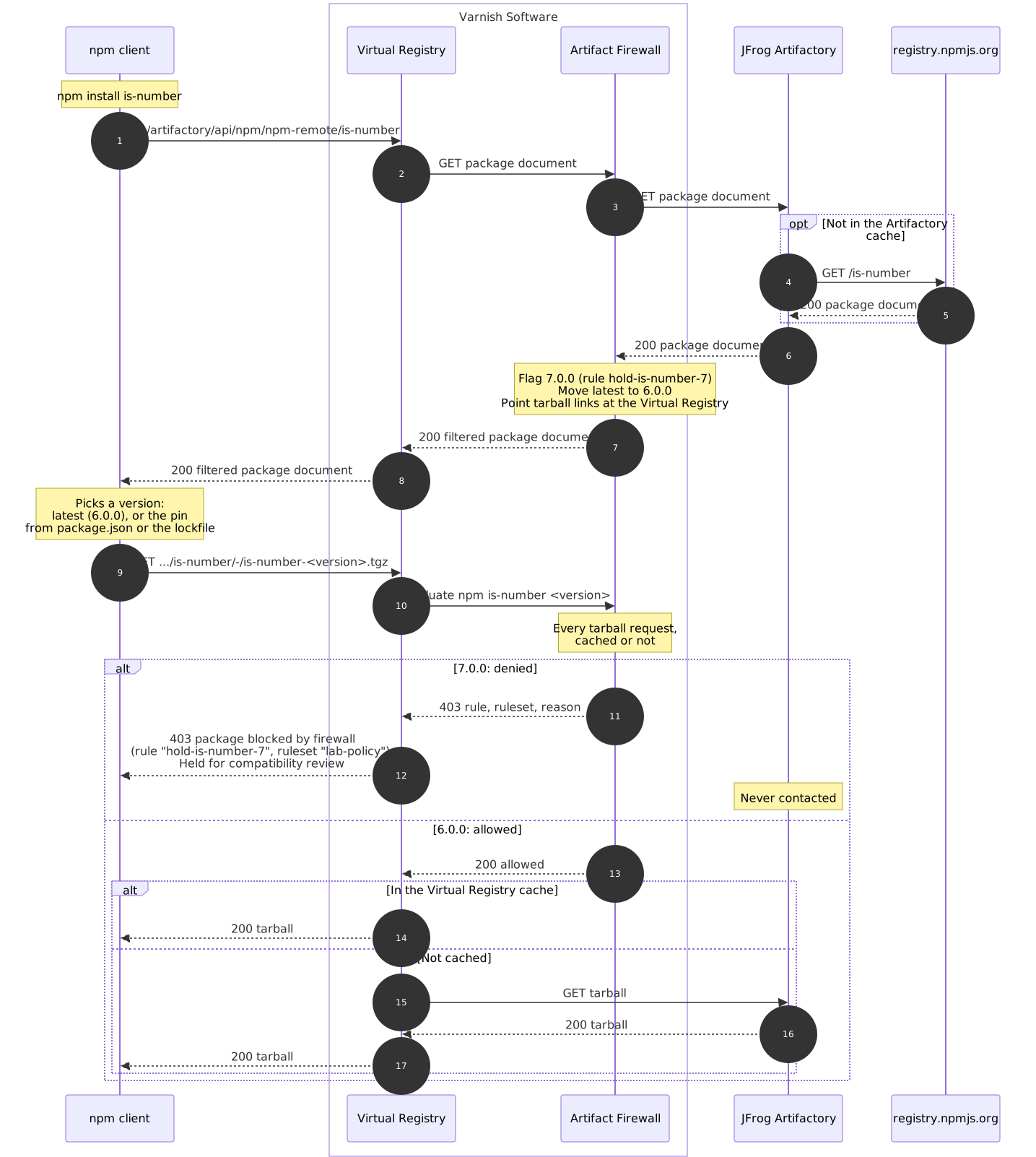
Create example-config.yaml:
varnish:
  http:
    - port: 80

virtual_registry:
  registries:
    - name: artifactory
      default: true
      base_url: http://localhost
      enable_firewall: true
      remotes:
        - url: https://example.jfrog.io

firewall:
  address: localhost
  default_action: allow
  audit_log_output: stdout
  rulesets:
    - path: /rulesets

license:
  file: /app/license.lic
The remote is the root of the Artifactory instance, not a single repository, so one registry entry serves every repository on it. Clients keep the Artifactory repository path: the npm registry URL becomes http://localhost/artifactory/api/npm/npm-remote/.
base_url is the address clients use to reach the firewall. The firewall writes it into the tarball links of every package document, so the downloads come back through the firewall instead of going straight to Artifactory.
Create a folder called rulesets/ next to your config, then add a file inside it:
# rulesets/lab.yaml
id: lab-policy

rules:
  - id: hold-is-number-7
    action: deny
    reason: "Held for compatibility review"
    match:
      - purl: "pkg:npm/is-number@7.0.0"
The purl names one exact version. 7.0.0 is the current latest of is-number, which shows what happens to developers who do not pin a version. The reason is returned to the developer with the 403, so write it for them. See the ruleset reference for the other ways to match packages.
Start the container:
docker run --rm -p 80:80 --name firewall \
  -v $(pwd)/example-config.yaml:/app/config.yaml:ro \
  -v $(pwd)/rulesets:/rulesets:ro \
  -v $(pwd)/license.lic:/app/license.lic:ro \
  varnish/orca --config /app/config.yaml
The log confirms the rule loaded:
time=... level=INFO msg="license verified" addons="[... sup-firewall ...]" expires=...
time=... level=INFO msg="loaded rulesets" default_action=allow rulesets=1 rules=1 exact_selectors=1 pattern_selectors=0
time=... level=INFO msg="Varnish is ready to receive traffic"
In another terminal, point npm at the firewall:
export NPM_CONFIG_REGISTRY=http://localhost/artifactory/api/npm/npm-remote/
Each command below uses a fresh npm cache (--cache=$(mktemp -d)), so npm has to ask the registry instead of reusing what it fetched before.
npm view is-number dist-tags.latest dist.tarball --prefer-online --cache=$(mktemp -d)
dist-tags.latest = '6.0.0'
dist.tarball = 'http://localhost/artifactory/api/npm/npm-remote/is-number/-/is-number-6.0.0.tgz'
Two things to check here. latest is now 6.0.0, since 7.0.0 is blocked. And the tarball link names the firewall, not Artifactory. If the link names your Artifactory host, the downloads bypass the firewall: check base_url.
npm pack is-number --cache=$(mktemp -d)
is-number-6.0.0.tgz
The developer gets 6.0.0 and no error. Anyone who installs the package without pinning a version, or with a range that 6.0.0 satisfies, gets the highest allowed version instead.
npm pack is-number@7.0.0 --cache=$(mktemp -d)
npm error code E403
npm error 403 403 Forbidden - GET http://localhost/artifactory/api/npm/npm-remote/is-number/-/is-number-7.0.0.tgz - package blocked by firewall (rule "hold-is-number-7", ruleset "lab-policy"): Held for compatibility review
npm error 403 In most cases, you or one of your dependencies are requesting
npm error 403 a package version that is forbidden by your security policy, or
npm error 403 on a server you do not have access to.
The developer sees the rule, the ruleset and your reason. The same happens for a project whose lockfile pins is-number@7.0.0, which is what a CI runner running npm ci hits:
npm error code E403
npm error 403 403 Forbidden - GET http://localhost/artifactory/api/npm/npm-remote/is-number/-/is-number-7.0.0.tgz - package blocked by firewall (rule "hold-is-number-7", ruleset "lab-policy"): Held for compatibility review
npm ci to Artifactory, around the firewall. Check the resolved URLs of your lockfiles when you move a project onto the firewall, and regenerate them against the firewall’s registry URL.
curl -s -w '\nHTTP %{http_code}\n' \
  http://localhost/artifactory/api/npm/npm-remote/is-number/-/is-number-7.0.0.tgz
{"error":"package blocked by firewall (rule \"hold-is-number-7\", ruleset \"lab-policy\"): Held for compatibility review","action":"deny","rule_id":"hold-is-number-7","ruleset_id":"lab-policy","reason":"Held for compatibility review"}

HTTP 403
This stays a 403 when Artifactory already holds the tarball in its cache, and when the firewall’s own cache holds an allowed version: every tarball request is evaluated, whether it is served from a cache or not.
With audit_log_output: stdout, the audit log is written to the container’s output as one JSON line per decision. The run above produced:
{"kind":"listing","registry":"artifactory","mode":"normal","outcome":"filtered","decisions":[{"purl":"pkg:npm/is-number@7.0.0","effect":"flagged","enforced_effect":"flagged","action":"deny","rule_id":"hold-is-number-7","ruleset_id":"lab-policy"}]}
{"kind":"eval","purl":"pkg:npm/is-number@6.0.0","rule_id":"default","ruleset_id":"default","action":"allow","enforced_action":"allow","registry":"artifactory","mode":"normal","outcome":"served"}
{"kind":"eval","purl":"pkg:npm/is-number@7.0.0","rule_id":"hold-is-number-7","ruleset_id":"lab-policy","action":"deny","enforced_action":"deny","registry":"artifactory","mode":"normal","outcome":"blocked"}
The listing line is the package document: 7.0.0 was flagged by hold-is-number-7. Each eval line is one download, with the rule that decided it and the outcome the client got. The id and ts fields are left out above. The audit log reference describes every field.
The audit log names the rule, not its reason. To read the reason behind a rule_id, look the rule up in its ruleset, or through the admin API.
