Varnish Controller requires a valid license file. Brainz needs to be able to read the license file
from the disk. The license file is specified with the argument -license or by setting the
environment variable VARNISH_CONTROLLER_LICENSE (see
brainz installation).
Brainz will output warnings in the log file when there are less or equal to 30 days until the license expires. When the license has expired, brainz will output errors in the log output, it will not be possible to login into the system! However, anything deployed will still be deployed. Hence, an expired license will only disable login for users and system administrator until the license file has been updated.
An updated license file will be automatically picked up, within a couple of seconds, by brainz. Updating the license file does not require a restart of any components of the Varnish Controller.
The Varnish Controller Router requires a Varnish Controller license that has the router addon included. The license is the same one that brainz loads and will be distributed to the routers.
If the router has an invalid license, it will not apply any configuration from Brainz, but it will
continue to run with any existing configuration until a new valid license is applied. The router
will run in an Unlicensed state without a valid license.
Since version 7.6.0, Varnish Enterprise runtime licenses can be distributed to all agents through the controller, instead of placing a license file on each Varnish server:
# Assign a Varnish Enterprise license (replaces the current one)
vcli license varnish add license.lic

# Show the currently assigned Varnish Enterprise license
vcli license varnish list
Each agent validates the license, stores it in its base directory and loads it into Varnish at
runtime. The license expiry is shown per agent in vcli agents list. Note that
vcli license varnish list only shows licenses assigned through the controller, not license files
placed directly on the Varnish servers.
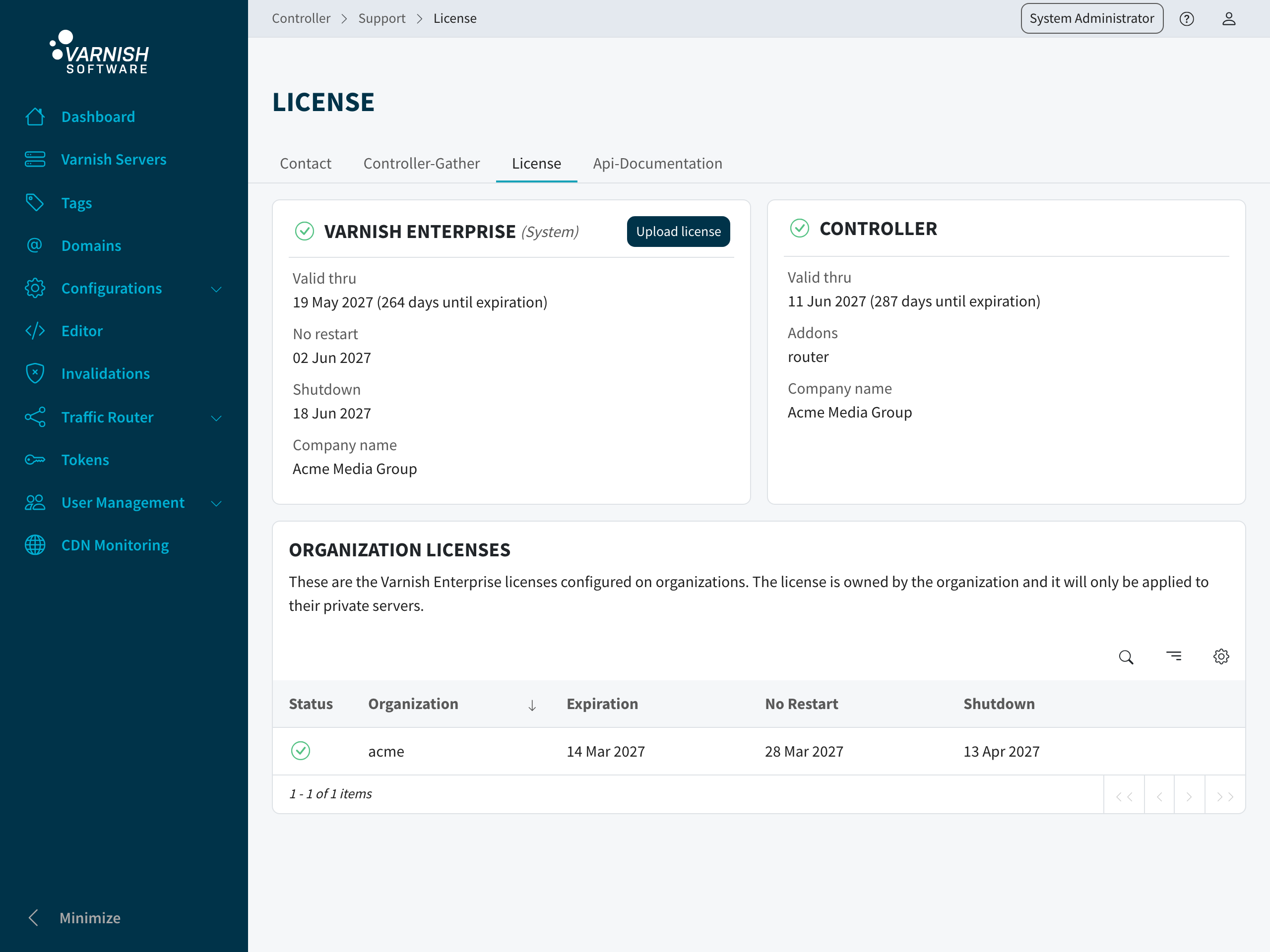
The Support > License page shows the licenses the Controller knows about. The two cards at the
top are the system-wide ones. The first is the Varnish Enterprise license distributed to the
agents, with its expiration, no-restart and shutdown dates. The second is the Varnish Controller
license with the addons it includes. Upload license replaces the Varnish Enterprise license,
the equivalent of vcli license varnish add.
Below them, Organization licenses lists the Varnish Enterprise licenses set on individual organizations. Such a license is owned by its organization and is only applied to that organization’s private servers.
Contact your sales representative or the support to retrieve a license file.
